
Rocket Builder
$10,000
( $5,000 Small Facility )
*Volume pricing also applies
Touchscreen
Rocket Controls
Single User
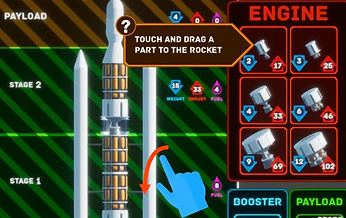
Build a rocket by choosing from various engines, fuel tanks, and payloads. Then launch the rocket into space to complete selected missions!
User Experience
Rocket Builder has three available mission modes: Reach Space, Obtain Orbit, and Mars Transfer. Each mode is progressively harder and introduces more real world mechanics for visitors to learn.
-
Reach Space: A simple altitude test. Once visitors master building a rocket, they can test its launch capabilities to see if the rocket can reach the mission altitude.
-
Obtain Orbit: Having mastered flight, visitors are taught that rockets need to orbit Earth to stay in space.
-
Mars Transfer: Once orbits are mastered, learn what it takes to make a transfer burn to leave Earths’ gravitational influence and head towards Mars.
User Interaction
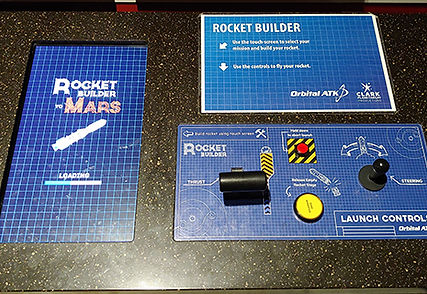
Visitors build rockets utilizing intuitive touch screen controls. They transition to a throttle and joystick to launch the rocket.
Touch Screen
-
Mission Select: Choose from a list of increasingly difficult missions.
-
Touch and Drag: Utilize the touch screen to build a custom rocket.
Throttle and Joystick
-
Throttle: Controls the amount of rocket thrust.
-
Joystick: Used to fight air resistance and control the rocket into space.
-
Buttons: Separate the rocket stages as the rocket ascends.
Educational Points
Learn about gravity, wind resistance and orbital dynamics.
-
Gravity: As visitors build a rocket and add components, the total rocket weight increases. Learn how difficult it is to get heavy payloads into space.
-
Wind Resistance: Earth's atmosphere is thick and provides ample drag on rockets. Learn about maximum dynamic pressure and how it affects rockets.
-
Orbital Dynamics: Rockets not only need to go up, they also need to orbit around Earth.
Hold Time Data
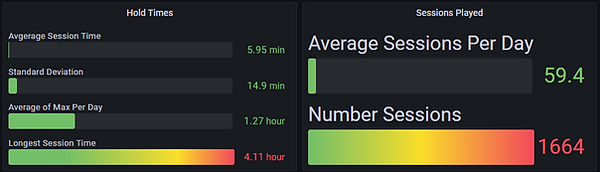
Visitors played on average up to 6 mins per day in a 4 week time span.
( The Average Maximum of each day was 1.27 hours )
Hardware provided
-
Keylok license dongle
-
Arduino-based control interface wired to arcade quality buttons. We provide an industrial grade throttle. Due to the cost, an industrial grade joystick can be purchased for $400.
Recommended hardware
-
Touch Screen
-
Display: Made to work on 4k or 2k displays. (Ensure Windows display scaling is set to 100%)
-
Audio: Speakers should be plugged directly into the computer. Using TV speakers may not work if the computer is on before the TV has been turned on.
Required Computer specs
-
Quad Core CPU (or better).
-
Power Supply: 600 Watt (or better).
-
Graphics Card: Nvidia RTX 3060 Ti (or better).
-
RAM: 16 GB (or greater).
-
SSD: 120+ GB.
-
OS: Windows 10 or Windows 11.