
Stellar Playground
$10,000
( $5,000 Small Facility )
*Volume pricing also applies
Touchscreen
Multi User 8+
We strongly recommend and built for the Ideum Platform.
Technically only for supporting 80+ touches, also it is resilient and reliable :)
Ideum


Experience and explore stellar life cycles, gravitational and orbital mechanics, and the advancement of civilizations by dragging and dropping stars and other exotic celestial objects. Through exploration and play, visitors can combine and create massive stars and observe the process of stellar evolution by creating white dwarfs, neutron stars, and even black holes. The collaborative touchscreen supports 80 simultaneous touches, encouraging group interactions.
User Experience
Stellar Playground simulates the gravitational pull of objects on each other and themselves. Each celestial body is a gravity simulated object moving about the game view.
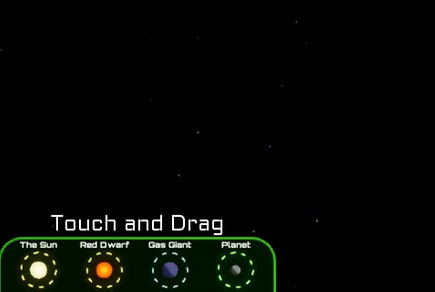
Palettes allow users to drop in one of four generic bodies.
-
1 solar mass star (the Sun)
-
0.1 solar mass star (Red Dwarf)
-
100 Earth mass Gas Giant
-
1 Earth mass Planet
Exploration and play occur as users not only drop generic bodies into the game, but also as those bodies orbit, collide, combine, and age.
Additional body types can be generated by:
Combining multiple bodies to produce:
-
White Stars
-
Blue stars
-
Giants
-
Super Giants
-
Mega Giants
Allowing bodies to age and die in various solar mass dependent scenarios producing:
-
White Dwarfs
-
Pulsars
-
Magnetars
-
Black holes
User Interaction
Visitors interact by touching the screen to drag and drop celestial bodies from the palettes located at each corner of the screen. They can also manipulate bodies in the open field. Since the Ideum Multitouch table supports up to 80 simultaneous touches, it allows many users working together (or in opposition) to create a more immersive experience.
Picking up a celestial body by touching it allows visitors to place it anywhere on the screen. It also allows users to select two additional modifiers for the body.
-
Lock: Locks celestial body into its position and ignores all gravity sources.
-
Orbit: Sets the initial velocity to orbit the nearest larger mass star.
-
Lock + Orbit: Celestial body enters orbit and ignores other gravity sources.
Dropping a celestial body by releasing touch will drop the body into the simulation. If the visitor is sliding their finger while releasing, the motion will contribute to the body’s initial velocity.
Educational Points
-
Gravity, Inertia, and Orbits: Simulated gravity lets visitors observe that stars both pull and are pulled on by other stars. Orbital dynamics of all bodies added to the open field are instantly observable.
-
Stellar Evolution: Larger mass stars burn hotter and faster, contributing to both their color and lifespan. Visitors can observe the color, temperature and lifespan of the star in real time, including changes as objects combine and change.
-
Stellar Birth and Death events: Visitors can create different stellar situations and observe the various death events of stars, such as planetary nebula from low-mass stars or supernovae from more massive stars. These events can produce new bodies – white dwarfs, pulsars, and black holes. Planetary nebula can also condense, forming new protostars and planets.
-
Planet habitability: Planets placed at a certain distance from a star are in the habitable zone where the planet can support liquid water. This distance is contingent upon mass. If the planet stays in this zone for enough time, simple life can develop. Over time, simple life becomes complex life, possibly generating a farming, industrial, nuclear and finally space age civilization where it will spawn space ships to colonize the universe!
Hold Time Data
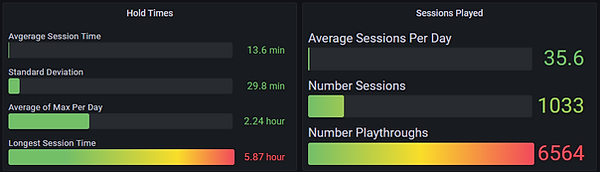
Visitors played on average up to 13 mins per day in a 2 week time span.
( The Average Maximum of each day was 2.24 hours )
Hardware provided
-
Keylok license dongle
Recommended hardware
-
We strongly recommend the Ideum Multitouch table - it is simple to set up, extremely durable, virtually turn key and supports up to 80 touches.
-
Supports Ideum Pano table (2, 4k Displays).
-
For non Ideum Multitouch products, we highly recommend a 4k display that allows more than 20 touches.
Required Computer specs
-
Quad Core CPU (or better).
-
Power Supply: 600 Watt (or better).
-
Graphics Card: Nvidia RTX 3060 Ti (or better).
-
RAM: 16 GB (or greater).
-
SSD: 120+ GB.
-
OS: Windows 10 or Windows 11.